
-
Бекофис / PMS
-
- Какво представляват iCal емисиите? И какво мога да правя с тях.
- Как да настроите продукти под настаняване
- Анулации
- Задаване на периодични условия
- Преглед на местата за настаняване
- Добавете ново настаняване
- Добавяне на цени / тарифи към място за настаняване
- Отстъпки
- Данъци
- Настроики
- Места / Стаи / Обекти
- Настройки за настаняване
- Как да организирам квартира?
-
- Как мога да работя със списъци с отчети?
- Как да променя номера на следващата фактура?
- Забавяне на финализирането на фактурата.
- Как да изпращам автоматично PDF или UBL фактури към моята счетоводна система?
- Връзки за директни плащания
- Как да работите със сметки в главната книга
- Брандиране на фактури за имейли
- Как изглежда екранът на фактурата
- Каква е разликата между концептуалните и окончателните фактури?
- Как да добавя продукт към фактурата?
- Как да финализирам фактура?
- Как да разпечатам окончателната фактура?
- Какво е UBL фактура?
-
- Как мога да работя със списъци с отчети?
- Как може да се презапише информация за гостите?
- Как работи функцията за сканиране на документи?
- Добавяне на гости
- Настройка на формуляр
- Настройки за гости
- Как да изпратите имейл до госта ръчно
- Как да променя информацията за госта?
- Как работят гост езиците?
- Как работят персонализираните полета?
- Как да създадете и използвате списък с блокирани гости
-
- Как мога да настроя цените си?
- Как да настроите опцията за късно напускане
- Отстъпки
- Данъци
- Настроики
- Как да настроя цени за кучета/домашни любимци?
- Как да настроя отстъпка за ранно записване?
- Как мога да променя цената на продукт за различни периоди?
- Кратко ръководство за това как да актуализирате цените
- Как да настроя изчислена ставка?
-
- Как мога да работя със списъци с отчети?
- Разбиране на ключовите показатели за ефективност в хотелиерството и ресторантьорството: Ръководство за ADR и RevPAR/RevPAP
- Експортиране на плащания
- Регистрационни номера
- Мога ли да запазя персонализирания си списък с резервации?
- Как да създадете и използвате списък с блокирани гости
- Къде да намеря статистиката на CBS?
-
- Как мога да работя със списъци с отчети?
- Копиране на резервация.
- Как може да се презапише информация за гостите?
- Как работи функцията за сканиране на документи?
- Кодове за грешки при изчисляване на цената
- Анулации
- Премахнете резервация от групова резервация
- Настройка на формуляр
- Комбинирайте две резервации
- Добавете съществуваща резервация към групова резервация
- Добавете нова резервация към група
- Разделяне на резервация
- Премахване на период от резервация
- Добавете дни към резервация
- Анулация на резервация в група
- Как да добавя плащане към резервация
- Как да добавите или промените място/стая/обект в резервация
- Информация за пътника
- Как да променя мястото на резервация?
- Как да добавя плащане към резервация?
- Как да изпратите имейл до госта ръчно
- Как да променя езика за комуникация за резервация?
- Как да променя информацията за госта?
- Създаване на нова резервация (бекенд)
- Как да експортирам данни за резервации в excel?
- Мога ли да запазя персонализирания си списък с резервации?
- Как работят анулациите?
- Какви статуси на резервации има?
- Как да променя статуса на резервация?
- Как да направя резервация?
- Как работят персонализираните полета?
- Как да създадете и използвате списък с блокирани гости
- Показване на оставащи статии (17) Свиване на статии
-
- Какво представляват iCal емисиите? И какво мога да правя с тях.
- Баланси
- Как да променя номера на следващата фактура?
- ДДС групи
- Настройки за онлайн резервации
- Работни процеси
- Как да активирам БЕТА функциите?
- Как да попреча на имейлите да бъдат маркирани като спам?
- Как да настроите двуфакторно удостоверяване (2FA)
- Как да настроя павилион?
- Специални дати
- Настройка на формуляр
- Имейли
- Карти за отстъпка
- Настройки на интерактивна карта
- Полета
- Как да работите със сметки в главната книга
- Брандиране на фактури за имейли
- Потребители
- Настройка на формуляр
- Роли
- Доставчици и методи
- Настройки за онлайн резервации
- Интеграция на уебсайт
- Настройки на фактурата
- Регистрационни номера
- Административни изображения
- Тагове
- Настройки за гости
- Как работят възрастовите таблици?
- Как работят гост езиците?
- Как да вляза с моя SSO акаунт?
- Брандиране
- Как работят персонализираните полета?
- Как да променя паролата, потребителските настройки и потребителското си име?
- Показване на оставащи статии (20) Свиване на статии
-
-
Онлайн резервация
- Как мога да настроя брандиране за моята система за онлайн резервации?
- Как да настроя хостваната онлайн резервация?
- Какви опции за онлайн резервация предлагате?
- Просто и разширено филтриране
- Настройки за онлайн резервации
- Настройка на формуляр
- Настройки за онлайн резервации
- Интеграция на уебсайт
- Как да настроите предварително дефинирано пристигане и заминаване
- Защо виждам цена, когато няма наличност?
-
App Store / Интеграции
- Ограничител на скоростта
- Какво е API и имате ли такъв?
- Какво е MCP сървър и имате ли такъв?
- Докладвайте вашата INE статистика
- Къде да намеря статистиката на CBS?
-
- Как да настроя приложението Mollie?
- Как да настроите приложението Stripe?
- Как да настроите приложението Worldline
- Как да настроите приложението PayPal
- Как да възстановя парите си чрез Camping.care Payments?
- Как да получавам плащания с кредитна карта, iDeal и други?
- Как работи приложението E-Guma Voucher?
- Как да настроите терминали Mollie
-
- Очаквайте скоро статии
-
- Как да настроите Чекин
- Как да настроя Fiskaltrust?
- Приложение Campez Couvert
- Как да използвате приложението Datev
- Регистрация на посетители на Feratel
- Докладвайте вашата INE статистика
- Къде да намеря статистиката на CBS?
- Цялостен експертен анализ на съответствието с германските данъчни изисквания за системи за управление на имоти, интегриращ fiskaltrust Middleware и облачни системи за техническа сигурност.
-
Място на продажба (POS)
-
Павилион за самообслужване
-
Хардуер
-
Поддръжка
-
Абонаменти
Как да настроя метод на плащане за автоматични плащания за вашите фактури от Camping.care?
Имате ли месечен абонамент или не искате сами да се затруднявате да плащате фактурите си? Няма проблем, можем да настроим автоматични плащания по 2 различни начина.
Вариант 1: Чрез Stripe
Можете лесно да настроите автоматични методи за плащане чрез нашия клиентски портал на Stripe. За да го направите, отидете на тази страница: https://app.camping.care/subscriptions Кликнете върху лилавия бутон ‘Управление на абонамента’. (Трябва да сте влезли в профила си, за да видите бутона)

Сега ще бъдете достъпни до ко-брандирания портал за абонаменти Stripe / Camping.care. Там можете да управлявате методите си на плащане.
Бакшиш: Можете също да настроите втори метод на плащане като резервен.
Плюсове Предлага най-голям брой (автоматични) методи на плащане.
Недостатъци Работи само за абонаментни плащания. Не работи за плащания, базирани на обем, като комисионните на booking.com.
Вариант 2: Чрез Moneybird
Можете също така да настроите мандат чрез MoneyBird. Това обхваща абонаменти и фактури, базирани на обем. Това може да стане чрез създаване на мандат чрез тази страница: https://app.camping.care/subscriptions/active и кликнете върху бутона за създаване на мандат.
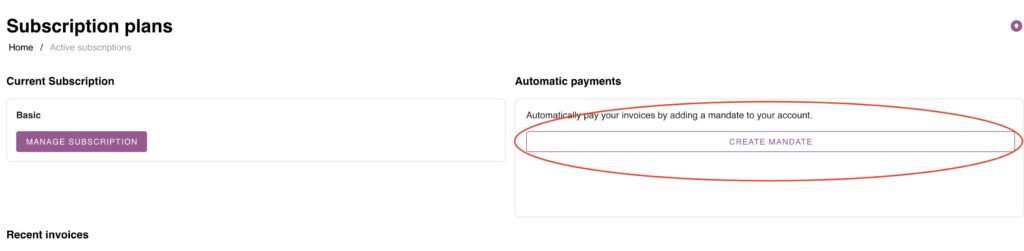
Плюсове Работи за абонаментни и обемни плащания.
Недостатъци Предлага SEPA методи за плащане само за клиенти от Холандия (iDeal) и Белгия (Bancontact).
 Bulgarian
  English
  Dutch
Dutch  German
  French
  Spanish
  Portuguese
  Italian
  Finnish
  Danish
  Swedish