
-
Backoffice / PMS
-
- ¿Qué son las fuentes iCal? ¿Y qué puedo hacer con ellas?
- Cómo configurar productos en alojamiento
- Cancelaciones
- Condiciones del período de configuración
- Resumen de alojamiento
- Añadir nuevo alojamiento
- Añadir precios/tarifas a un alojamiento
- Descuentos
- Impuestos
- Opciones
- Lugares / Habitaciones / Objetos
- Configuración del alojamiento
- ¿Cómo montar un alojamiento?
-
- ¿Cómo puedo trabajar con listas de informes?
- ¿Cómo cambio el próximo número de factura?
- Retrasar la finalización de la factura.
- ¿Cómo envío facturas PDF o UBL a mi sistema de contabilidad automáticamente?
- Enlaces de pago directo
- Cómo trabajar con cuentas contables
- Marca de factura para correos electrónicos
- ¿Cómo se ve la pantalla de factura?
- ¿Cuál es la diferencia entre factura conceptual y final?
- ¿Cómo agrego un producto a la factura?
- ¿Cómo finalizar una factura?
- ¿Cómo imprimo la factura final?
- ¿Qué es una factura UBL?
-
- ¿Cómo puedo trabajar con listas de informes?
- ¿Cómo se puede sobrescribir la información de los huéspedes?
- ¿Cómo funciona el escaneo de documentos?
- Agregar invitados
- Configuración del formulario
- Configuración de invitados
- Cómo enviar un correo electrónico al huésped manualmente
- ¿Cómo modifico la información del huésped?
- ¿Cómo funcionan los idiomas invitados?
- ¿Cómo funcionan los campos personalizados?
- Cómo crear y utilizar una lista de invitados bloqueados
-
- ¿Cómo puedo configurar mis precios?
- Cómo configurar la opción de Late Check-out
- Descuentos
- Impuestos
- Opciones
- ¿Cómo configuro precios para perros/mascotas?
- ¿Cómo configuro un descuento por reserva anticipada?
- ¿Cómo puedo cambiar el precio de un producto para diferentes períodos?
- Guía rápida sobre cómo actualizar precios
- ¿Cómo configuro una tarifa calculada?
-
- ¿Cómo puedo trabajar con listas de informes?
- Comprensión de las métricas clave de rendimiento en la industria hotelera: una guía sobre ADR y RevPAR/RevPAP
- Exportar pagos
- Matrículas
- ¿Puedo guardar mi lista de reservas personalizadas?
- Cómo crear y utilizar una lista de invitados bloqueados
- ¿Dónde encontrar las estadísticas de CBS?
-
- ¿Cómo puedo trabajar con listas de informes?
- Copiar una reserva.
- ¿Cómo se puede sobrescribir la información de los huéspedes?
- ¿Cómo funciona el escaneo de documentos?
- Códigos de error de cálculo de precios
- Cancelaciones
- Eliminar una reserva de una reserva de grupo
- Configuración del formulario
- Combina dos reservas
- Añadir una reserva existente a una reserva de grupo
- Añadir una nueva reserva a un grupo
- Dividir una reserva
- Eliminar un período dentro de una reserva
- Añadir días a una reserva
- Cancelación de una reserva en un grupo
- Cómo añadir un pago a una reserva
- Cómo añadir o cambiar un lugar/habitación/objeto en una reserva
- Información del viajero
- ¿Cómo cambio el lugar de una reserva?
- ¿Cómo añadir un pago a una reserva?
- Cómo enviar un correo electrónico al huésped manualmente
- ¿Cómo cambio el idioma de comunicación para una reserva?
- ¿Cómo modifico la información del huésped?
- Crear una nueva reserva (Backend)
- ¿Cómo exporto datos de reservas a Excel?
- ¿Puedo guardar mi lista de reservas personalizadas?
- ¿Cómo funcionan las cancelaciones?
- ¿Qué tipo de estados de reserva existen?
- ¿Cómo cambio el estado de una reserva?
- ¿Cómo hago una reserva?
- ¿Cómo funcionan los campos personalizados?
- Cómo crear y utilizar una lista de invitados bloqueados
- Mostrar artículos restantes (17) Contraer artículos
-
- ¿Qué son las fuentes iCal? ¿Y qué puedo hacer con ellas?
- Saldos
- ¿Cómo cambio el próximo número de factura?
- Grupos de IVA
- Configuración de reservas en línea
- Flujos de trabajo
- ¿Cómo habilito las funciones BETA?
- ¿Cómo evito que los correos electrónicos se marquen como spam?
- Cómo configurar la autenticación de dos factores (2FA)
- ¿Cómo configuro un quiosco?
- fechas especiales
- Configuración del formulario
- correos electrónicos
- Tarjetas de descuento
- Configuración del mapa interactivo
- Campos
- Cómo trabajar con cuentas contables
- Marca de factura para correos electrónicos
- Usuarios
- Configuración del formulario
- Roles
- Proveedores y métodos
- Configuración de reservas en línea
- Integración del sitio web
- Configuración de factura
- Matrículas
- Imágenes de administración
- Etiquetas
- Configuración de invitados
- ¿Cómo funcionan las tablas de edad?
- ¿Cómo funcionan los idiomas invitados?
- ¿Cómo inicio sesión con mi cuenta SSO?
- Marca
- ¿Cómo funcionan los campos personalizados?
- ¿Cómo cambio mi contraseña, configuración de usuario y nombre de usuario?
- Mostrar artículos restantes (20) Contraer artículos
-
-
Reserva en línea
- ¿Cómo puedo configurar la marca para mi motor de reservas online?
- ¿Cómo configuro la reserva online alojada?
- ¿Qué tipo de opciones de reserva online ofrecen?
- Filtrado simple y avanzado
- Configuración de reservas en línea
- Configuración del formulario
- Configuración de reservas en línea
- Integración del sitio web
- Cómo configurar una llegada y salida predefinidas
- ¿Por qué veo un precio cuando no hay disponibilidad?
-
App Store / Integraciones
- Limitador de velocidad
- ¿Qué es una API y tienes una?
- ¿Qué es un servidor MCP y tienes uno?
- Reporta tus estadísticas al INE
- ¿Dónde encontrar las estadísticas de CBS?
-
- ¿Cómo configurar la aplicación Mollie?
- ¿Cómo configurar la aplicación Stripe?
- Cómo configurar la aplicación Worldline
- Cómo configurar la aplicación de PayPal
- ¿Cómo puedo reembolsar dinero a través de Camping.care Payments?
- ¿Cómo recibo tarjetas de crédito, iDeal y otros pagos?
- ¿Cómo funciona la aplicación de cupones E-Guma?
- Cómo configurar terminales Mollie
-
- Artículos próximamente
-
- Cómo configurar Chekin
- ¿Cómo configuro Fiskaltrust?
- Aplicación Campez Couvert
- Cómo utilizar la aplicación Datev
- Registro de visitantes de Feratel
- Reporta tus estadísticas al INE
- ¿Dónde encontrar las estadísticas de CBS?
- Análisis exhaustivo de expertos sobre el cumplimiento fiscal alemán para sistemas de gestión de propiedades que integran el middleware de fiskaltrust y los sistemas de seguridad técnica basados en la nube
-
Punto de Venta (POS)
-
Quiosco de autoservicio
-
Hardware
-
Apoyo
-
Suscripciones
El cierre diario se puede realizar de forma automática.
Para ello, utilizamos saldos. Cada saldo tiene su propia cantidad de dinero.
Para obtener más información sobre cómo configurar los saldos y utilizarlos puedes consultar este tema: Saldos
Normalmente, se puede usar un saldo para cada caja. Así, sabrá exactamente cuánto dinero hay en el cajero. El artículo también muestra que es posible retirar dinero del saldo (Retiro) y depositarlo (Depósito). Estas funciones se pueden usar si retira dinero del cajero y lo lleva al banco. Puede consultar los datos reales.
Si habilitó el cierre automático del saldo diario, el sistema lo cerrará automáticamente durante la noche (a partir de las 0:00). Si desea cerrarlo manualmente antes, es posible. Solo cerramos el saldo automáticamente durante la noche cuando se agregan nuevas transacciones al cajero.
Para ver un resumen de los saldos antiguos creados automáticamente, puede ir a Informes->Finanzas->Nuevo informe->Todos los saldos si lo va a usar por primera vez. Si ya lo agregó, puede encontrarlo en la sección Informes->Finanzas->Todos los saldos.
En la lista, verá un resumen de todos los saldos cerrados. Puede filtrar estas listas como de costumbre, como la lista de reservas.
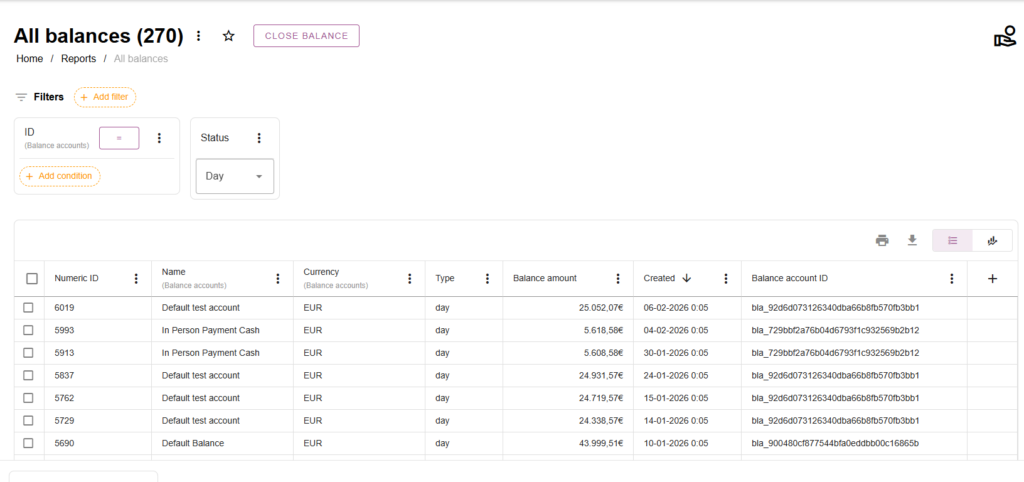
Al hacer clic en un saldo verás esta descripción general:
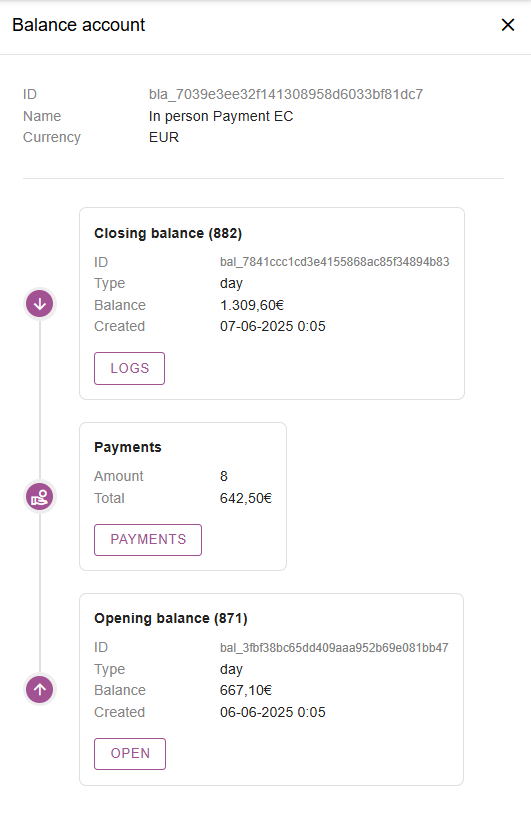
En este resumen, vemos la clasificación diaria del 7-6-2025. Se generó automáticamente a las 0:05.
En este cierre diario hubo 8 pagos
Y el inicio diario fue el 06-06-2025
Si hacemos clic en el botón Pagos veremos todos los pagos que hubo en el cierre diario:
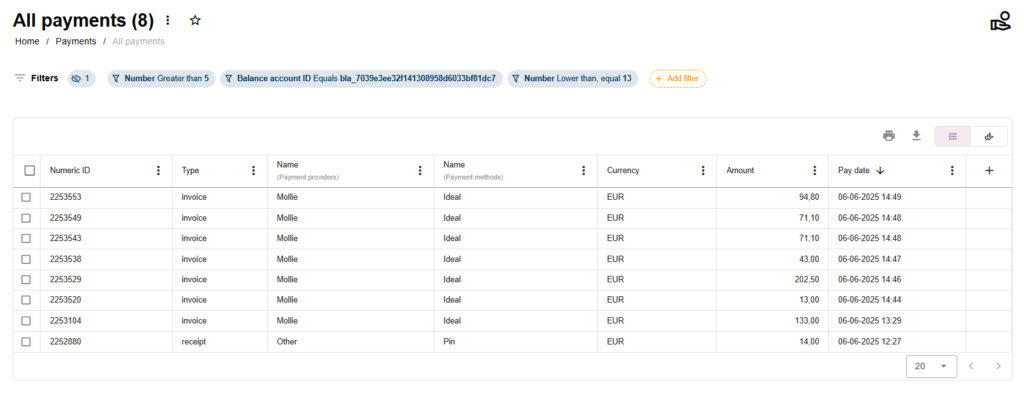
Conclusión: No proporcionamos ningún documento pdf para el informe Z, pero está disponible en la interfaz.
 Spanish
  English
  Dutch
Dutch  German
  French
  Portuguese
  Italian
  Finnish
  Danish
  Bulgarian
  Swedish