
-
Backoffice / PMS
-
- Mitä ovat iCal-syötteet? Ja mitä niillä voi tehdä?
- Kuinka laittaa tuotteita asuntojen alle
- Peruutukset
- Kauden ehtojen asettaminen
- Yleinen majoitus
- Lisää uusi majoitus
- Hintojen lisääminen majoituskohteeseen
- Alennukset
- Verot
- Vaihtoehdot
- Paikat / Huoneet / Esineet
- Majoitusasetukset
- Kuinka perustaa majoitus?
-
- Kuinka voin työskennellä raporttiluetteloiden kanssa?
- Kuinka muutan seuraavan laskun numeron?
- Laskun viimeistelyn lykkääminen.
- Miten lähetän PDF- tai UBL-laskuja kirjanpitojärjestelmääni automaattisesti?
- Suorat maksulinkit
- Kuinka työskennellä kirjanpitotilien kanssa
- Laskun brändäys sähköposteihin
- Miltä laskunäyttö näyttää
- Mitä eroa on konsepti- ja loppulaskuilla?
- Miten lisään tuotteen laskulle?
- Kuinka viimeistellä lasku?
- Miten tulostan loppulaskun?
- Mikä on UBL-lasku?
-
- Kuinka voin työskennellä raporttiluetteloiden kanssa?
- Miten vieraan tiedot voidaan korvata?
- Miten skannausasiakirja toimii?
- Lisätään vieraita
- Lomakkeen asetukset
- Vieraiden asetukset
- Sähköpostin lähettäminen vieraalle manuaalisesti
- Miten voin muokata vieraan tietoja?
- Miten vieraskielet toimivat?
- Miten mukautetut kentät toimivat?
- Estettyjen vieraiden listan luominen ja käyttäminen
-
- Miten voin asettaa hintani?
- Myöhäisen uloskirjautumisen asettaminen käyttöön
- Alennukset
- Verot
- Vaihtoehdot
- Miten asetan hinnat koirille/lemmikkieläimille?
- Miten otan käyttöön Early Bird -alennuksen?
- Miten voin muuttaa tuotteen hintaa eri ajanjaksoille?
- Pikaopas hintojen päivittämiseen
- Miten määritän laskennallisen hinnan?
-
- Kuinka voin työskennellä raporttiluetteloiden kanssa?
- Keskeisten suorituskykymittareiden ymmärtäminen hotelli- ja ravintola-alalla: Opas ADR:ään ja RevPAR/RevPAP:iin
- Maksujen vienti
- Rekisterikilvet
- Voinko tallentaa mukautetun varausluetteloni?
- Estettyjen vieraiden listan luominen ja käyttäminen
- Mistä löydän CBS:n tilastot?
-
- Kuinka voin työskennellä raporttiluetteloiden kanssa?
- Kopioi varaus.
- Miten vieraan tiedot voidaan korvata?
- Miten skannausasiakirja toimii?
- Hintalaskennan virhekoodit
- Peruutukset
- Varauksen poistaminen ryhmävarauksesta
- Lomakkeen asetukset
- Yhdistä kaksi varausta
- Lisää olemassa oleva varaus ryhmävaraukseen
- Lisää uusi varaus ryhmään
- Jaa varaus
- Poista jakso varauksesta
- Lisää päivät varaukseen
- Ryhmävarauksen peruutus
- Maksun lisääminen varaukseen
- Paikan/huoneen/kohteen lisääminen tai muuttaminen varauksessa
- Matkailijan tiedot
- Miten muutan varauksen paikkaa?
- Kuinka lisätä maksu varaukseen?
- Sähköpostin lähettäminen vieraalle manuaalisesti
- Miten vaihdan varauksen viestintäkielen?
- Miten voin muokata vieraan tietoja?
- Luo uusi varaus (taustaohjelma)
- Kuinka voin viedä varaustiedot Exceliin?
- Voinko tallentaa mukautetun varausluetteloni?
- Miten peruutukset toimivat?
- Millaisia varaustiloja on olemassa?
- Kuinka muutan varauksen tilan?
- Miten teen varauksen?
- Miten mukautetut kentät toimivat?
- Estettyjen vieraiden listan luominen ja käyttäminen
- Näytä jäljellä olevat artikkelit (17) Kutista artikkelit
-
- Mitä ovat iCal-syötteet? Ja mitä niillä voi tehdä?
- Saldot
- Kuinka muutan seuraavan laskun numeron?
- ALV-ryhmät
- Verkkovarausasetukset
- Työnkulut
- Kuinka otan BETA-ominaisuudet käyttöön?
- Kuinka estän sähköpostien merkitsemisen roskapostiksi?
- Kahden tekijän todennuksen (2FA) määrittäminen
- Kuinka perustan kioskin?
- Erityiset päivämäärät
- Lomakkeen asetukset
- Sähköpostit
- Alennuskortit
- Interaktiiviset karttaasetukset
- Kentät
- Kuinka työskennellä kirjanpitotilien kanssa
- Laskun brändäys sähköposteihin
- Käyttäjät
- Lomakkeen asetukset
- Roolit
- Palveluntarjoajat ja menetelmät
- Verkkovarausasetukset
- Verkkosivuston integrointi
- Laskutusasetukset
- Rekisterikilvet
- Hallintokuvat
- Tunnisteet
- Vieraiden asetukset
- Miten ikätaulukot toimivat?
- Miten vieraskielet toimivat?
- Kuinka kirjaudun sisään SSO-tililläni?
- Brändäys
- Miten mukautetut kentät toimivat?
- Miten vaihdan salasanani, käyttäjäasetukseni ja käyttäjätunnukseni?
- Näytä jäljellä olevat artikkelit (20) Kutista artikkelit
-
-
Online varaus
- Kuinka voin määrittää brändäyksen online-varauskoneelleni?
- Miten otan käyttöön isännöidyn online-varauspalvelun?
- Millaisia online-varausvaihtoehtoja tarjoat?
- Yksinkertainen ja edistynyt suodatus
- Verkkovarausasetukset
- Lomakkeen asetukset
- Verkkovarausasetukset
- Verkkosivuston integrointi
- Kuinka määrittää ennalta määritelty saapumis- ja lähtöaika
- Miksi näen hinnan, vaikka tuotetta ei ole saatavilla?
-
App Store / Integraatiot
- Rate Limiter
- Mikä on API ja onko sinulla sellainen?
- Mikä on MCP-palvelin ja onko sinulla sellainen?
- Ilmoita INE-tilastosi
- Mistä löydän CBS:n tilastot?
-
- Miten Mollie-sovellus määritetään?
- Kuinka ottaa Stripe-sovellus käyttöön?
- Kuinka määrittää Worldline-sovellus
- PayPal-sovelluksen asentaminen
- Miten palautan rahat Camping.care Paymentsin kautta?
- Miten vastaanotan luottokortti-, iDeal- ja muita maksuja?
- Kuinka E-Guma Voucher -sovellus toimii?
- Mollie-päätteiden asentaminen
-
- Kuinka muodostaa yhteys Ferateliin
- Kuinka muodostaa yhteys Pitchup.com-sivustoon
- Kuinka muodostan yhteyden Booking.comiin?
- Miten ACSI/Camping.info-yhteys toimii?
- Ongelmia varausten kanssa Booking.comin kautta
- Miten muodostan yhteyden ACSI:in ja Camping.infoon?
- Miten muodostan yhteyden Qenner-kanavaan?
- Miten muodostan yhteyden Airbnb:hen?
-
- Artikkelit tulossa pian
-
- Chekinin asentaminen
- Miten Fiskaltrust otetaan käyttöön?
- Campez Couvert -sovellus
- Datev-sovelluksen käyttöohjeet
- Feratelin vierailijarekisteröinti
- Ilmoita INE-tilastosi
- Mistä löydän CBS:n tilastot?
- Kattava asiantuntija-analyysi Saksan verolainsäädännön noudattamisesta kiinteistönhallintajärjestelmissä, jotka integroivat fiskaltrust-väliohjelmiston ja pilvipohjaiset tekniset turvajärjestelmät
-
Myyntipiste (POS)
-
Itsepalvelukioski
-
Laitteisto
-
Tukea
-
Tilaukset
Camping.caren ja Airbnb:n välinen yhteys toimii kanavanhallintatyökalun kautta, jota kutsutaan nimellä Qenner.
Camping.caressa voit määrittää hintasi ja tuotteesi, ja Qenner yhdistää ne Airbnb-tiliisi.
Asenna sovellus
Vuonna Camping.care-sovelluskauppa voit asentaa sovelluksen. Avaa vain Airbnb-sovellus:
Ja sitten napsauta asennuspainiketta:
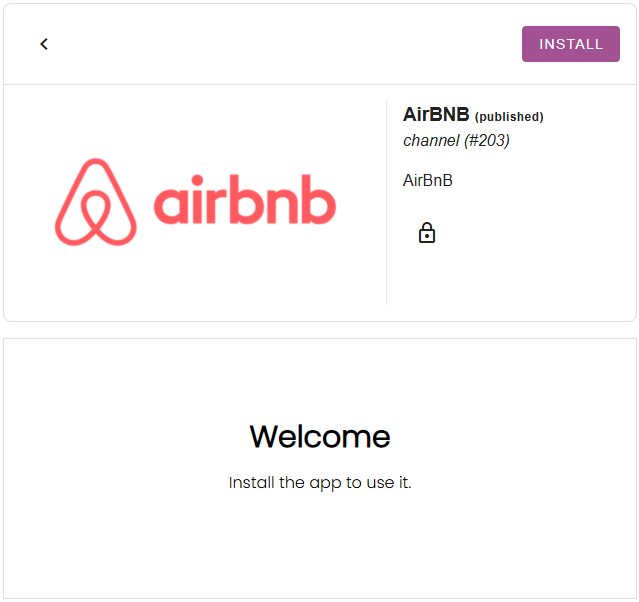
Jos et näe kanavasovellusta sovelluskaupassa, ota meihin yhteyttä osoitteessa support@camping.care.
Aseta hintasi
Camping.care-palvelussa asettamasi hinnat voidaan yhdistää myös ulkoisiin kanaviin. Airbnb-sovelluksessa voit valita hinnan majoituspaikkaa kohden:
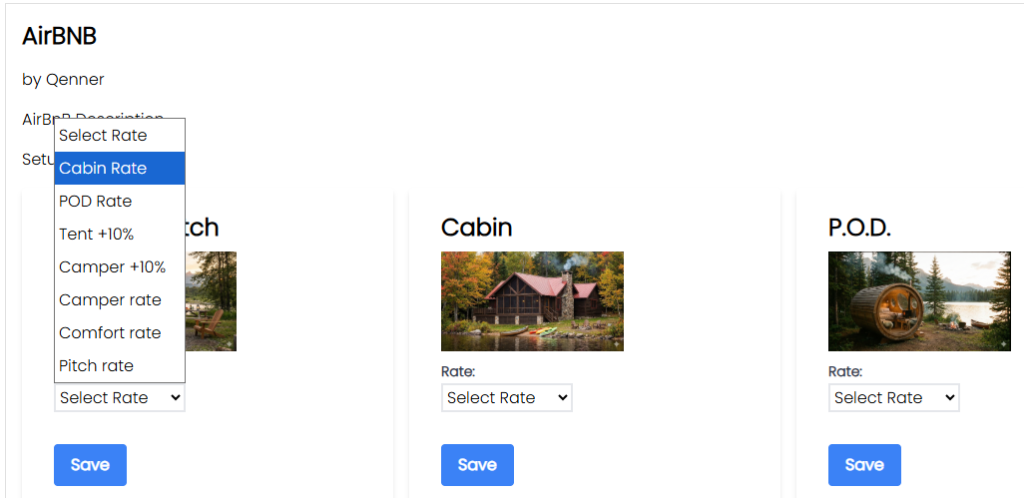
Hinta on sitten valmis Qennerin lähetettäväksi Airbnb:lle.
Jos haluat asettaa kanavalle eri hinnan kuin omalle varaussivustollesi, voit halutessasi määrittää laskennallisen hinnan. Lisätietoja tästä löytyy täältä. tässä.
Määritä tuotteesi
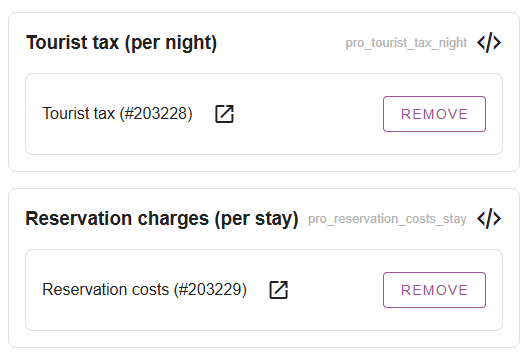
Kun olet määrittänyt hintasi, saatat haluta määrittää myös muutamia tuotteita varattavaksi Airbnb:n kautta. Asetukset -> Kanavanhallinta -> Tuotteet Voit lisätä tuotteita tiettyjä lisämaksuja vastaan.
Näitä voivat olla matkailuverot, varausmaksut, lemmikkieläinmaksut jne.:
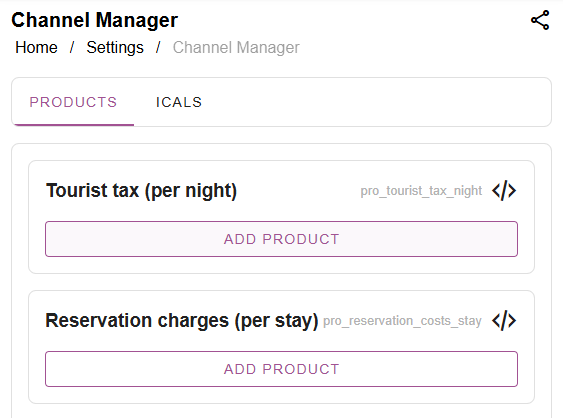
Saatat haluta luoda erilliset tuotteet kanaville sen sijaan, että käyttäisit samoja tuotteita, joita käytät omissa online-varauksissasi. Napsauta sitten vain “Lisää tuote”, hae tuote ja valitse se:
Täytä perehdytyslomake ja ilmoita Qennerille
Tärkeä: Qenner ei tiedä varmasti, milloin olet saanut kaikki valmiiksi, koska et ehkä ehdi tehdä kaikkea samaan aikaan.
Kun olet asettanut hintasi ja tuotteesi, sinun on täytettävä tämä lomake. Lomake antaa Qennerille kaikki tarvittavat tiedot Airbnb:n käyttöönoton aloittamiseksi.
Lähetä heille myös sähköpostia osoitteeseen support@qenner.com ilmoittaaksesi heille, että olet valmis. Ja älä unohda mainita leirintäalueesi nimeä ja kanavaa, johon haluat muodostaa yhteyden.
 Finnish
  English
  Dutch
Dutch  German
  French
  Spanish
  Portuguese
  Italian
  Danish
  Bulgarian
  Swedish