
-
Backoffice / PMS
-
- What are iCal feeds? And what can I do with them.
- How to set up products under accommodations
- Cancellations
- Setting period conditions
- Accommodations overview
- Add new accommodation
- Adding Prices / Rates to an accommodation
- Discounts
- Taxes
- Options
- Places / Rooms / Objects
- Accommodation settings
- How to set up an accommodation?
-
- How can I work with report lists?
- How do I change the next invoice number?
- Delay invoice finalization.
- How do I send PDF or UBL invoices to my Accountancy System automatically?
- Direct payment links
- How to work with ledger accounts
- Invoice branding for e-mails
- How does the invoice screen looks like
- What is the difference between concept and final invoices?
- How do I add a product to the invoice?
- How to finalize an invoice?
- How do I print the final invoice?
- What is a UBL invoice?
-
- How can I work with report lists?
- How can guest information be overwritten?
- How does the Scan Document work?
- Adding guests
- Form setup
- Guests settings
- How to send an email to the guest manually
- How do i modify the informations of the guest?
- How do guest languages work?
- How do custom fields work?
- How to Create and Use a Blocked Guest List
-
- How can I work with report lists?
- Copy a reservation.
- How can guest information be overwritten?
- How does the Scan Document work?
- Price calculation error codes
- Cancellations
- Remove a reservation from a group booking
- Form setup
- Combine two bookings
- Add a existing booking to a group booking
- Add a new booking to a group
- Split a booking
- Remove a period within a booking
- Add days to a booking
- Cancellation of a booking in a group
- How to add a payment to a reservation
- How to add or change a place / room / object in a reservation
- Traveller info
- How do I change the place of a reservation?
- How to add a payment to a reservation?
- How to send an email to the guest manually
- How do I change the communication language for a reservation?
- How do i modify the informations of the guest?
- Create a new reservation (Backend)
- How do I export reservation data to excel?
- Can I save my custom reservations list?
- How do cancellations work?
- What kind of reservation statuses are there?
- How do I change the status of a booking?
- How do I make a reservation?
- How do custom fields work?
- How to Create and Use a Blocked Guest List
- Show Remaining Articles (17) Collapse Articles
-
- What are iCal feeds? And what can I do with them.
- Balances
- How do I change the next invoice number?
- VAT Groups
- Online Booking Settings
- Workflows
- How do I enable the BETA Features?
- How do I prevent emails to be marked as Spam?
- How to setup two factor authentication (2FA)
- How do I set up a Kiosk?
- Special dates
- Form setup
- E-mails
- Discount cards
- Interactive map settings
- Fields
- How to work with ledger accounts
- Invoice branding for e-mails
- Users
- Form setup
- Roles
- Providers & methods
- Online Booking Settings
- Website Integration
- Invoice settings
- License Plates
- Administration images
- Tags
- Guests settings
- How do age tables work?
- How do guest languages work?
- How do I login with my SSO account?
- Branding
- How do custom fields work?
- How do I change my password, user settings and username?
- Show Remaining Articles (20) Collapse Articles
-
-
Online booking
- How can i setup branding for my online booking engine?
- How do I setup the hosted online booking?
- What kind of online booking options do you provide?
- Simple and advanced filtering
- Online Booking Settings
- Form setup
- Online Booking Settings
- Website Integration
- How to setup a pre defined arrival and departure
- Why do I see a price when there's no availability?
-
App Store / Integrations
- Rate Limiter
- What is an API and do you have one?
- What is an MCP server and do you have one?
- Report your INE statistics
- Where to find the CBS statistics?
-
- Articles coming soon
-
- How to setup Chekin
- How do I setup Fiskaltrust?
- Campez Couvert App
- How to use the Datev App
- Feratel Visitor Registration
- Report your INE statistics
- Where to find the CBS statistics?
- Comprehensive Expert Analysis of German Fiscal Compliance for Property Management Systems Integrating fiskaltrust Middleware and Cloud-Based Technical Security Systems
-
Point of Sale (POS)
-
Self Service Kiosk
-
Hardware
-
Support
-
Subscriptions
The daily closure can be made automatically.
We use balances for this. Each balance has its own “amount of money” in the balance.
For more information about how to set up balances and use them you can see this topic: Balances
Normally a balance can be used for every single cash desk. So you now exactly how many money is in the cashier. In the artilcle it also shows that it is possible to take money out of the balance (Withdrawal) and add money to a Balance (Deposit). These features can be used if you take money out of the cashier and bring it to the bank. You can view the actual data.
If you enabled auto closure of the daily balance then the system automatically closes the balance overnight (starting at 0:00). If you want to to manually close it earlier this is possible. We only close the balance overnight automatically when there are new transactions added to the cashier.
For an overview of old the balances created automatically you can go to the Reports->Financial->New Report->All Balances if you are going to use it for the first time. If you already added it, you can find it in the section Reports->Financial->All Balances.
In the list you will get an overview of all closed balances. You can filter these lists as you are used to such as the reservations list.
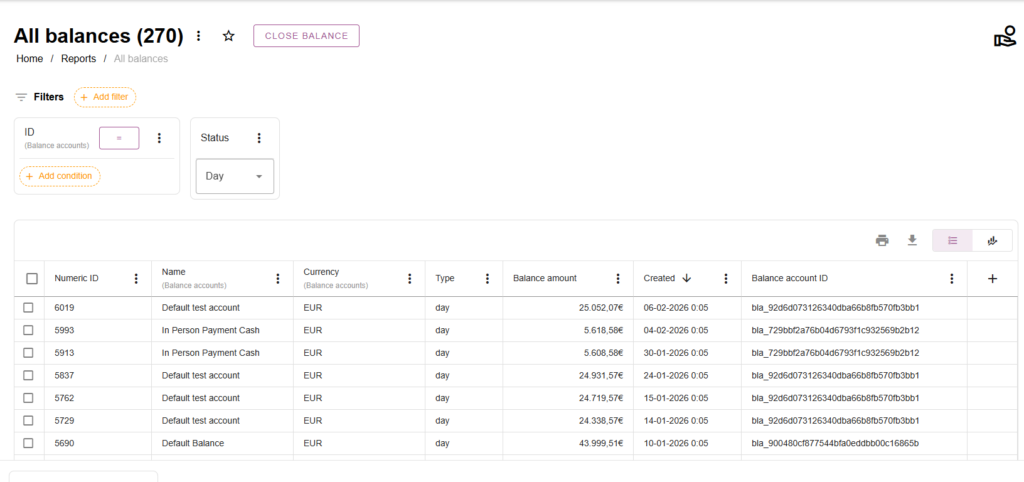
When you click a balance you will see this overview:
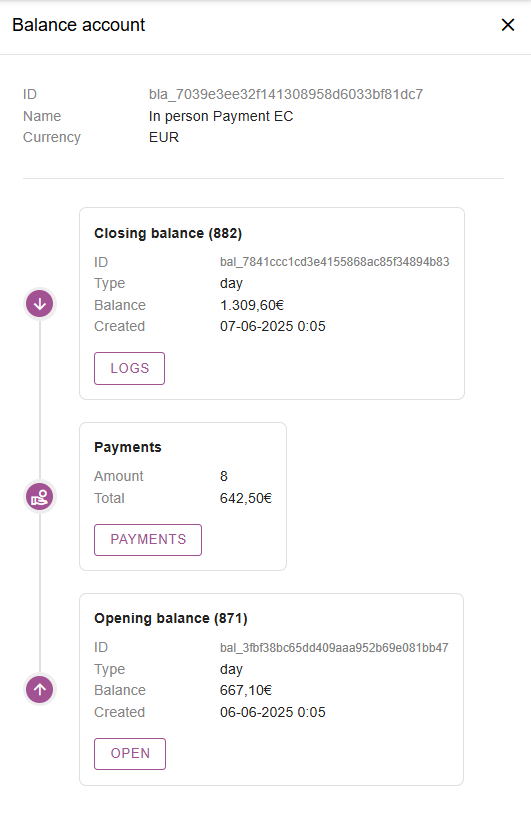
In this overview we see the daily clisure of 7-6-2025. It is auto generated on 0:05.
In this daily closure there were 8 payments
And the daily start was on 06-06-2025
If we click the Payments button we will see all payments which were in the daily closure:
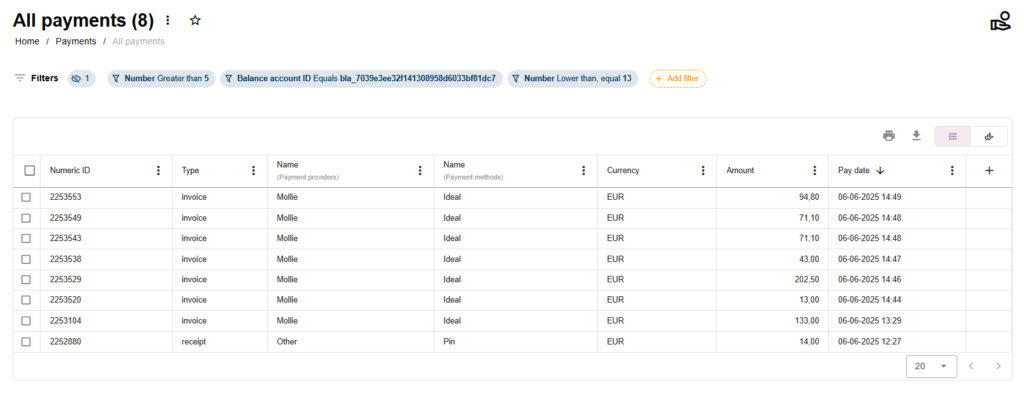
Conclusion: We do not supply any pdf document for the Z-report but it is available in the interface.
 English
  Dutch
Dutch  German
  French
  Spanish
  Portuguese
  Italian
  Finnish
  Danish
  Bulgarian
  Swedish