
-
Backoffice / PMS
-
- What are iCal feeds? And what can I do with them.
- How to set up products under accommodations
- Cancellations
- Setting period conditions
- Accommodations overview
- Add new accommodation
- Adding Prices / Rates to an accommodation
- Discounts
- Taxes
- Options
- Places / Rooms / Objects
- Accommodation settings
- How to set up an accommodation?
-
- How can I work with report lists?
- How do I change the next invoice number?
- Delay invoice finalization.
- How do I send PDF or UBL invoices to my Accountancy System automatically?
- Direct payment links
- How to work with ledger accounts
- Invoice branding for e-mails
- How does the invoice screen looks like
- What is the difference between concept and final invoices?
- How do I add a product to the invoice?
- How to finalize an invoice?
- How do I print the final invoice?
- What is a UBL invoice?
-
- How can I work with report lists?
- How can guest information be overwritten?
- How does the Scan Document work?
- Adding guests
- Form setup
- Guests settings
- How to send an email to the guest manually
- How do i modify the informations of the guest?
- How do guest languages work?
- How do custom fields work?
- How to Create and Use a Blocked Guest List
-
- How can I work with report lists?
- Copy a reservation.
- How can guest information be overwritten?
- How does the Scan Document work?
- Price calculation error codes
- Cancellations
- Remove a reservation from a group booking
- Form setup
- Combine two bookings
- Add a existing booking to a group booking
- Add a new booking to a group
- Split a booking
- Remove a period within a booking
- Add days to a booking
- Cancellation of a booking in a group
- How to add a payment to a reservation
- How to add or change a place / room / object in a reservation
- Traveller info
- How do I change the place of a reservation?
- How to add a payment to a reservation?
- How to send an email to the guest manually
- How do I change the communication language for a reservation?
- How do i modify the informations of the guest?
- Create a new reservation (Backend)
- How do I export reservation data to excel?
- Can I save my custom reservations list?
- How do cancellations work?
- What kind of reservation statuses are there?
- How do I change the status of a booking?
- How do I make a reservation?
- How do custom fields work?
- How to Create and Use a Blocked Guest List
- Show Remaining Articles (17) Collapse Articles
-
- What are iCal feeds? And what can I do with them.
- Balances
- How do I change the next invoice number?
- VAT Groups
- Online Booking Settings
- Workflows
- How do I enable the BETA Features?
- How do I prevent emails to be marked as Spam?
- How to setup two factor authentication (2FA)
- How do I set up a Kiosk?
- Special dates
- Form setup
- E-mails
- Discount cards
- Interactive map settings
- Fields
- How to work with ledger accounts
- Invoice branding for e-mails
- Users
- Form setup
- Roles
- Providers & methods
- Online Booking Settings
- Website Integration
- Invoice settings
- License Plates
- Administration images
- Tags
- Guests settings
- How do age tables work?
- How do guest languages work?
- How do I login with my SSO account?
- Branding
- How do custom fields work?
- How do I change my password, user settings and username?
- Show Remaining Articles (20) Collapse Articles
-
-
Online booking
- How can i setup branding for my online booking engine?
- How do I setup the hosted online booking?
- What kind of online booking options do you provide?
- Simple and advanced filtering
- Online Booking Settings
- Form setup
- Online Booking Settings
- Website Integration
- How to setup a pre defined arrival and departure
- Why do I see a price when there's no availability?
-
App Store / Integrations
-
Point of Sale (POS)
-
Self Service Kiosk
-
Hardware
-
Support
-
Subscriptions
Installing the Feratel App
- Login to your Camping.care account and go to the App Store.
- Find the Feratel App in the list and click on it.
- Click on the install button in the top right corner and click install again.
Discover the Purpose of This App
The Deskline 3.0 VT PMS Web Service are the successor of MeldeClient import interfaces for hotel software. It provides several methods for data interchange between Feratel Deskline 3.0 and Property management systems. The main goal is to insert visitor tax sheets from PMS into Deskline, which is the tool for community to settle the visitor taxes.
This app provides a guest card printing service from Feratel. It adds a widget to the guest view, allowing guests to easily print their guest card.
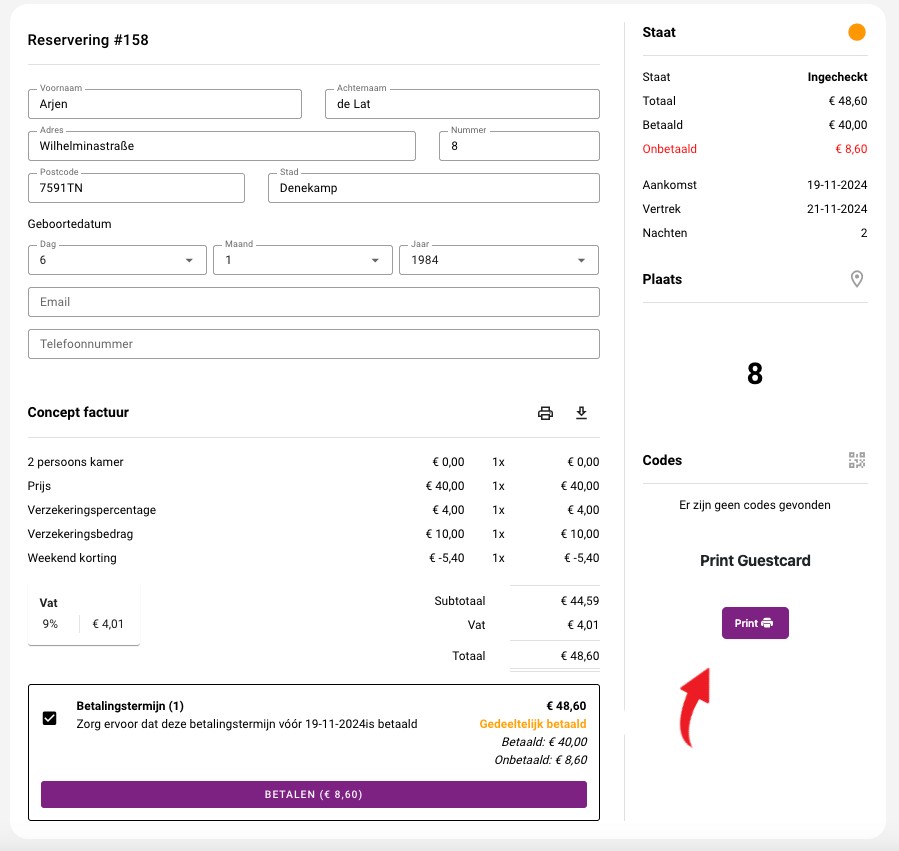
The app also integrates with the back office, enabling you to print the guest card directly from there.

On installing
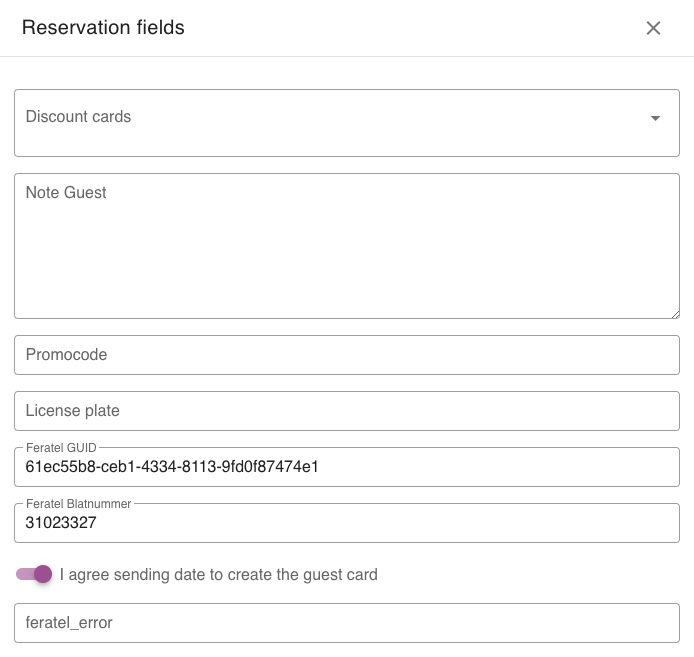
Upon installation, the app generates three fields: GUID, Blatnr. These fields are added to each reservation, and every reservation will have its own unique set of fields.
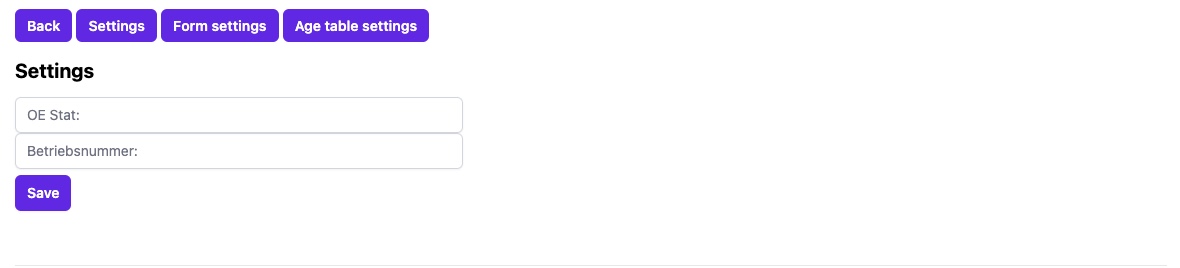
The settings page
On this page you can put your Feratel credentials so Camping Care can connect to Feratel. The credentials will be provided by Feratel. Please make sure the following fields are filled in correctly:
- OE STAT
- Betriebsnummer
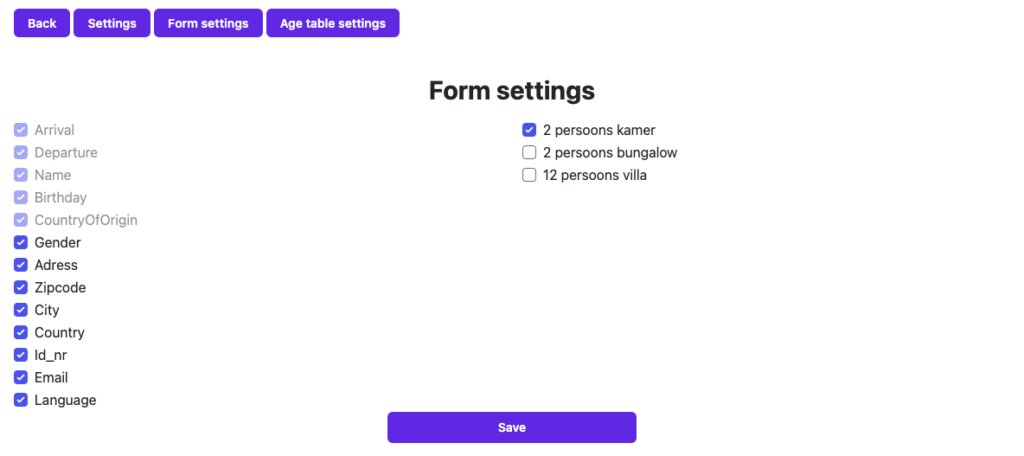
Form settings page
On this page, you can configure the data sent to Feratel. Some fields are required and will appear in gray. On the right side, you will see your accommodations. Only the accommodations you select will use the Feratel app, and reservations for these accommodations will be sent to Feratel.
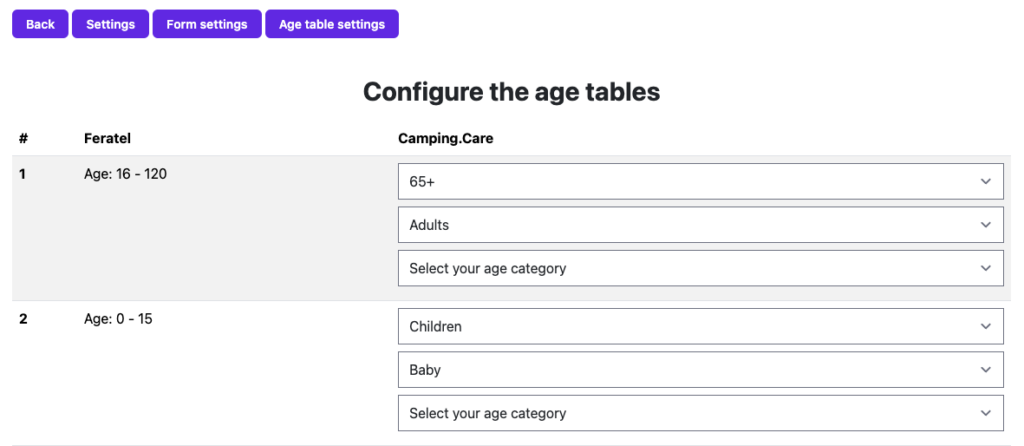
Age table settings page
On this page, you can configure the age categories for Feratel and Camping Care. Each row represents an age category from Feratel; however, Camping Care may have multiple age categories within the same Feratel age range. Each Camping Care age category can be set only once.
Using the app
After installation and configuring the settings, the app is ready to use and responds to the following events:
- Reservation created: When a reservation is created as a pre-registration, the app sends the data to Feratel.
- Reservation checked-in: When guests checked in, the app converts the pre-registration into an active reservation and sends the updated data to Feratel.
- Reservation checked-out: When guests checked out, the app finalizes the reservation data and sends it to Feratel.
- Reservation cancellation: If a reservation is canceled, the app notifies Feratel. If the cancellation occurs during the reservation period, the app checks out the reservation and includes the cancellation date when sending the data to Feratel.
- Reservation updated: If there is an update or change in the reservation duration, the app sends the entire reservation with the updated data to Feratel.